Shopify Markets 2026: Plans, Fees, Managed Markets at 3.5%
Shopify Markets read on November 4, 2026: unlimited markets on every plan, 1.5% currency conversion for US stores, Managed Markets at 3.5% (3.25% on Plus).
 Nicolas ProvostNov 4, 2026 · 16 min read
Summarize this article with an AI
 ChatGPT
 Claude
Table of contents (12)
Key takeaways
- Creating country or region markets is included on every Shopify plan, and the Help Center sets no limit on how many a store can create (read on November 4, 2026).
- A US store on Shopify Payments pays a 1.5% currency conversion fee when a customer pays in another currency, and 3% through PayPal Wallet, as of November 4, 2026.
- Collecting duties and import taxes at checkout costs 0.5% per order, a temporary rate in place since February 2, 2025, against a regular 0.85% with Shopify Payments.
- Managed Markets, called Markets Pro until June 2024, makes Global-e the merchant of record for 3.5% per transaction on Basic, Grow and Advanced and 3.25% on Plus, as of November 4, 2026.
Shopify Markets is Shopify's built-in tool for selling to several countries from one store: for each market you set the currency, language, domain, catalog, prices, and duties and taxes. Creating country or region markets is included on every plan, with no limit on their number, according to Shopify's Help Center read on November 4, 2026. You pay per sale instead, according to Shopify's international pricing page: for a US store on Shopify Payments, a 1.5% currency conversion fee, and 0.5% per order if you collect duties at checkout. On the same page, Managed Markets, formerly Markets Pro, hands the cross-border work to Global-e for 3.5% per transaction (3.25% on Plus).
This guide reads Shopify's Help Center, its international pricing page and its changelog as they stood on November 4, 2026, for a store based in the United States, in US dollars.
What is Shopify Markets?
A market is a group of customers you define in your store, and each market has two parts: conditions (who it applies to) and customizations (what those customers see). Shopify lists four market types:
| Market type | Condition | Typical use |
|---|---|---|
| Country or region | The customer's geographic location | Selling abroad, one country or a group of countries per market |
| B2B | Your wholesale company locations | Wholesale products, prices and payment terms |
| Retail | Your POS locations | Different products or prices per physical store |
| Channel | Your sales channels | Products, prices and currency for a given channel |
Source: Shopify Help Center, market types, read on November 4, 2026.
The market types page also states that there is no limit to the number of country or region markets you can create. This article covers country and region markets. Wholesale markets have their own rules and catalog limits, covered in our guide to Shopify B2B.
Three defaults shape what happens on day one, according to Shopify's setup page:
- A domestic market is created from your store's home country, address and currency. Its country is also your backup region.
- An international market is created with a list of countries where similar merchants sell. It is inactive by default.
- The backup region is what visitors outside every active market see. Only customers in a country that belongs to an active market can check out.
How much does Shopify Markets cost?
Markets has no subscription of its own. The costs come from payments, currency conversion and the optional duties calculation:
| Cost | Rate on November 4, 2026 (US store) | Source |
|---|---|---|
| Creating country or region markets | Included on all plans | Help Center |
| Currency conversion, Shopify Payments | 1.5% | Help Center, local currencies |
| Currency conversion, PayPal Wallet for Shopify Payments | 3% | Help Center, fees |
| Duties and import taxes calculated at checkout | 0.5% (temporary rate); regular rate 0.85% with Shopify Payments, 1.5% with other providers | Help Center, duties |
| Card processing | Varies with your plan, the card type and where the card was issued | Shopify international pricing |
| Managed Markets (optional) | 3.5% on Basic, Grow and Advanced; 3.25% on Plus | Help Center, Managed Markets |
What each line means in practice:
Currency conversion. The fee applies when a customer pays in a currency other than your payout currency, and Shopify's local currencies page sets it at 1.5% for US stores and 2% for stores in other regions. The exchange rate itself is a mid-market rate with no markup. With automatic exchange rates, the fee is built into the price the customer sees. With manual rates, it is not added to prices and comes out of your payout. No conversion fee applies with a third-party payment provider, because customers then pay in your default currency.
Refunds. Shopify's fees page states that conversion fees and card fees aren't returned when you refund an order, but no additional conversion fee applies to refunds or chargebacks.
Duties. The duties page says the fee was temporarily lowered to 0.5% effective February 2, 2025, and gives no end date. It is charged on every order that has duties and import taxes calculated at checkout, even if the calculated amount is zero. Orders shipped within your store's own country, orders shipped between EU member countries and abandoned checkouts are not charged.
Shopify's international pricing page sets these fees side by side, with and without Managed Markets.
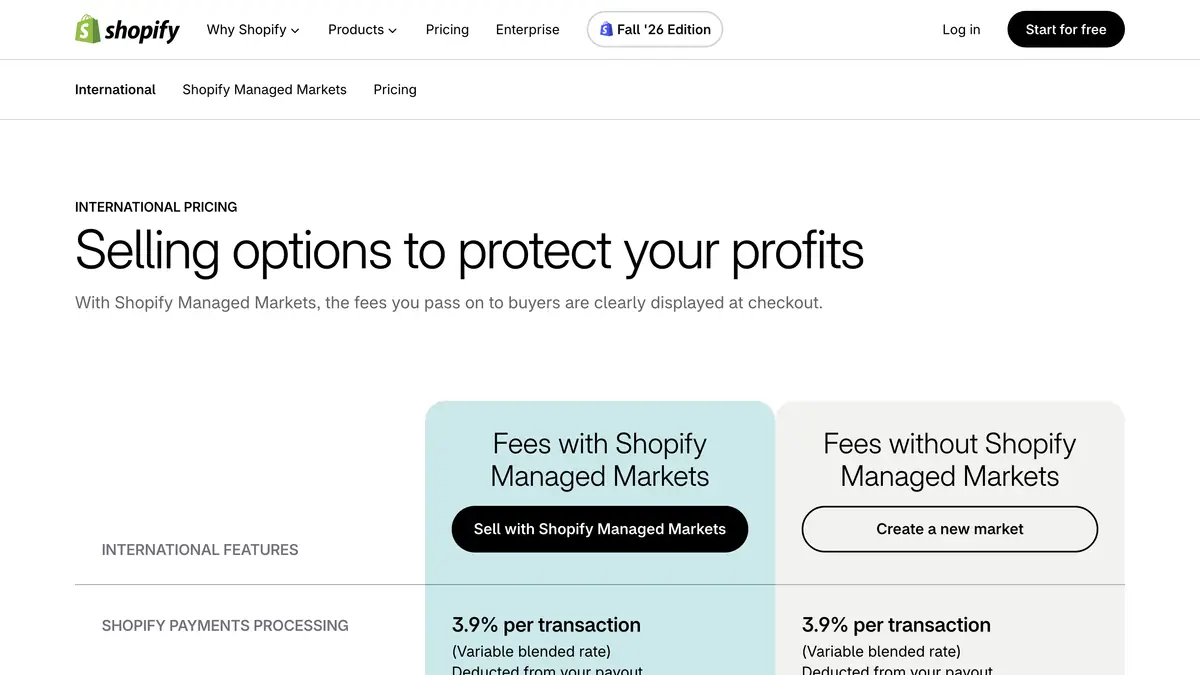 Source: Shopify international pricing page, read on November 4, 2026.
For the card rates of each plan and the rest of the subscription costs, see our guide to Shopify pricing.
Which Shopify plans get which Markets features?
Most of Markets works on every plan. The differences are in how far you can customize the theme, the checkout and the legal setup per market:
| Feature | Starter and Basic | Grow | Advanced | Plus |
|---|---|---|---|---|
| Create country or region markets | Yes | Yes | Yes | Yes |
| Currency per market | Yes | Yes | Yes | Yes |
| Domain and language per market | Yes | Yes | Yes | Yes |
| Product catalog per market | Yes | Yes | Yes | Yes |
| Discounts for specific markets | Yes | Yes | Yes | Yes |
| Duties and taxes per market | Yes | Yes | Yes | Yes |
| Theme customization per market | No | No | Yes | Yes |
| Checkout and account pages per market | No | No | Yes | Yes |
| Checkout page blocks per market | No | No | No | Yes |
| Business entities per market | No | No | No | Yes |
| Languages per store | Up to 20 on Basic | Up to 20 | Up to 20 | Up to 30 |
Sources: Shopify Help Center, Markets requirements and considerations and selling in multiple languages, read on November 4, 2026. The Markets table groups Starter with Basic; the languages page gives the 20-language limit for Basic, Grow and Advanced.
Two notes on this table:
- On Basic and Grow, every market shares one theme setup. You can translate, convert currency and change prices, but a different banner or layout per country needs Advanced or Plus.
- B2B markets follow other rules. The same Help Center table allows up to 3 catalogs across all B2B markets below Plus, and the B2B pages state that Shopify B2B isn't available on the Starter plan.
On languages, Shopify's languages page says the checkout includes translated content for 49 languages. Plan prices are in our Shopify pricing guide, and what Plus adds, including its terms, is in our guide to Shopify Plus pricing.
What is Managed Markets, formerly Markets Pro?
Managed Markets is Shopify's merchant of record service for cross-border sales. A Shopify changelog post dated July 2, 2024 states that, starting June 24, the tool formerly known as Markets Pro would be renamed Managed Markets, and that the change would not affect existing features.
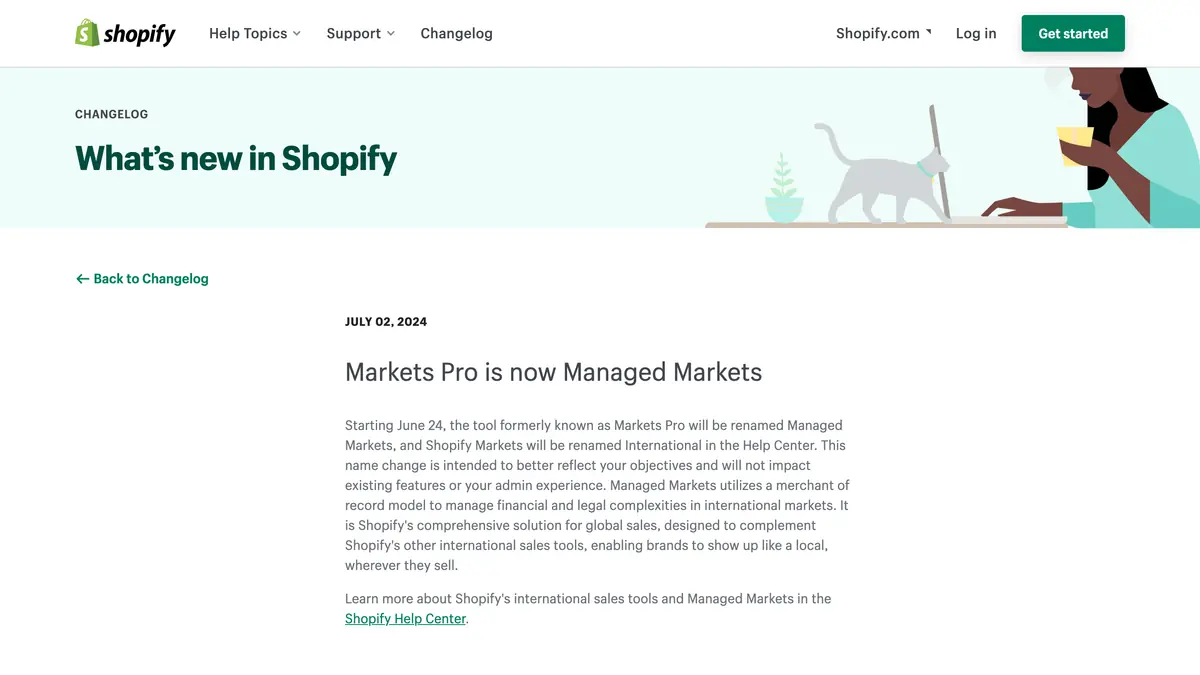 Source: Shopify changelog, "Markets Pro is now Managed Markets", read on November 4, 2026.
With Managed Markets, Global-e becomes the merchant of record: the legal entity responsible for the sale in the other country. According to Shopify's Help Center, it handles:
- tax registration and remittance to local authorities, so you don't need to register in the countries you sell to;
- local payment methods;
- duties and import taxes, collected at checkout (delivered duty paid wherever it is supported);
- adaptive pricing, which shows duty- and tax-inclusive prices while keeping your payouts in line with domestic orders.
Shopify's Managed Markets page says the service supports selling to 150+ regions, and that some high-risk currency markets, including Argentina, Turkey, Lebanon and Venezuela, are not supported.
Who can use Managed Markets?
The requirements page sets these conditions for a US business:
- based in the continental United States, excluding territories such as Puerto Rico and Guam;
- at least one non-PO box location and one fulfillment location in the continental US;
- Shopify Payments, with USD as the store currency;
- store and product information available in English;
- products that meet the prohibited and restricted items rules.
Some things don't work with it: B2B orders and free orders (you stay the merchant of record for those), subscriptions on international orders, the Global-e app at the same time, and Shopify Collabs. Customers must also give a phone number at checkout, and an order can't be edited once a shipping label is printed or the order is fulfilled.
How are Managed Markets fees charged?
Shopify's international pricing page lists a fee of 3.5% per transaction, or 3.25% on Shopify Plus, deducted from your payout. By default, managed international pricing raises international product prices to cover it, so your net payout is similar to a domestic order. On the same pricing page, currency conversion costs 1.5%, the same as your Shopify Payments rate, duties and tax calculations are guaranteed at no additional cost, and card processing applies as usual. If you set prices manually per market, Shopify notes that the cross-border fees are no longer built into the buyer's price and come out of your payout.
| Shopify Markets on your own | With Managed Markets | |
|---|---|---|
| Who is the seller abroad | You | Global-e, as merchant of record |
| Tax registration, filing and remittance | Your job | Handled by Global-e |
| Duties at checkout | Optional, 0.5% per order (temporary rate) | Included, guaranteed, no additional fee |
| Currency conversion (US store) | 1.5%, included in buyer price | 1.5%, included in buyer price |
| Extra transaction fee | None | 3.5% (3.25% on Plus) |
| Plans | All plans | Fee published for Basic, Grow, Advanced and Plus |
Sources: Shopify international pricing page and Managed Markets overview, read on November 4, 2026.
What does an international order cost? A worked example
The store is fictional. It is a US store on the Grow plan, with $10,000 a month of orders from the United Kingdom, paid in pounds. For the card fee we use the 3.9% "variable blended rate" that Shopify's international pricing page uses as its example; your real rate depends on your plan and your customers' cards. Each rate is applied to the order amount for illustration.
Option 1: Shopify Markets, automatic exchange rates, duties collected at checkout.
- Card processing: 3.9% of $10,000 = $390, deducted from your payout.
- Duties calculation: 0.5% of $10,000 = $50, deducted from your payout.
- Currency conversion: 1.5% of $10,000 = $150, built into the prices your UK customers see.
- Total taken from your payout: $440 a month. Tax registrations and filings in the UK, if your sales require them, remain yours to handle.
Option 2: Managed Markets.
- Card processing: $390, as above.
- Managed Markets fee: 3.5% of $10,000 = $350, deducted from your payout but covered by higher international prices under managed pricing.
- Currency conversion: $150, built into buyer prices.
- Duties: no additional fee, and Global-e handles tax registration and remittance.
The trade-off is visible in the numbers. Option 1 keeps your UK prices lower and costs you about $440 a month on top of your own compliance work. Option 2 raises your UK prices by the Managed Markets fee and the conversion fee, shows duties and taxes inside the price, keeps your payout close to a domestic order, and removes the registration and remittance work.
How do you set up Shopify Markets?
The steps below follow Shopify's create and activate markets page:
- Check the two requirements. Multi-currency payments need Shopify Payments or Adyen, and every country you want to sell to needs shipping rates: a market can only be activated where rates exist. Our guide to Shopify shipping rates covers the setup.
- Open the Markets page in your Shopify admin and review the domestic and international markets Shopify created.
- Click Create market, enter a name and choose the Draft status so you can preview it first.
- Add a condition. In the Includes section, click Add condition and choose Regions, then pick the countries.
- Review the Inherited section. Settings come from your store defaults or a parent market. Click the plus icon next to a setting to customize it: currency, domain and language, catalog, duties and taxes.
- Translate the store. Shopify's Translate & Adapt app is listed as free on the App Store, with translations by Shopify for up to 2 languages, or 8 in select countries, and manual translations beyond that.
- Pick a URL structure. Shopify's SEO page recommends subfolders (yourstore.com/fr/) for most stores; subdomains and country domains are the alternatives. Hreflang tags, canonical URLs and sitemaps are generated automatically.
- Activate the market by changing its status from Draft to Active, then click Save and place a test order in the market's currency and language.
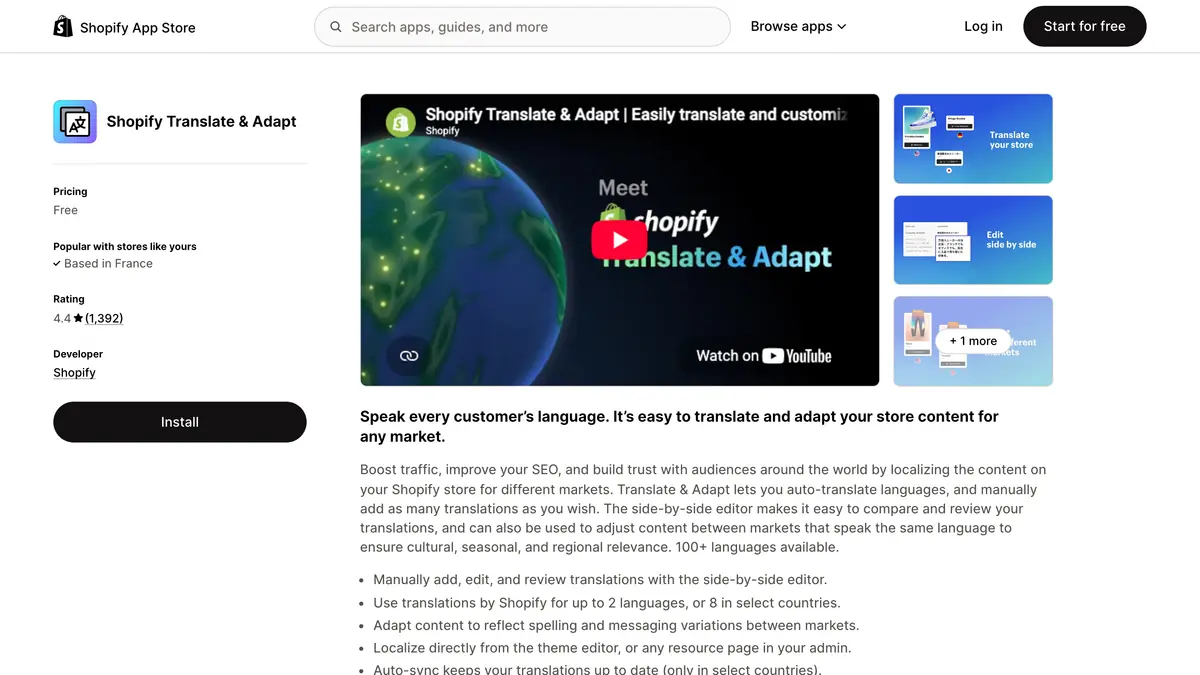 Source: Shopify Translate & Adapt on the Shopify App Store, read on November 4, 2026.
To switch to Managed Markets later, Shopify's activation page describes the path: Markets, then Managed Markets, then Start selling internationally. Products are reviewed for prohibited items first; most get a result in seconds, but a large catalog can take a few hours.
What limits should you plan around?
Shopify's requirements page and its languages page list the constraints that most often catch stores out:
- Fixed amount discounts are created in your default currency only and converted at checkout.
- Staff permissions can't be set per market: someone who can view orders sees the orders of every market.
- One published theme: you can customize it per market on Advanced and Plus, but only one theme is live at a time.
- Post-purchase offers work only in your default currency, so they don't appear in markets that use another currency.
- Translations have gaps: product, article and blog tags can't be translated, the word "products" in URLs can't be translated, and URL slugs can't be customized per market.
One store with markets, or one store per country?
Markets is built for the first case. Shopify's international overview describes several stores as an option for businesses with globally dispersed teams that independently manage operations in their local market. Expansion stores on Plus, and the terms that come with them, are covered in our Shopify Plus pricing guide.
Where does WhatsApp fit when you sell abroad?
Selling in a new country also means talking to customers there: order confirmations, shipping updates, campaigns. If your customers abroad use WhatsApp, the cost of each message follows their country. Meta's WhatsApp pricing page states that charges by message category vary with the recipient's country calling code. Our WhatsApp Business pricing guide lists the rates by country, and our comparison of WhatsApp and SMS costs by country puts them side by side.
For a US store, one rule changes the plan. Meta's per-user marketing limits page states that WhatsApp does not currently deliver marketing template messages to users with US phone numbers. WhatsApp campaigns therefore make sense for your international markets rather than your domestic one; our article on WhatsApp marketing in the USA explains what still works at home.
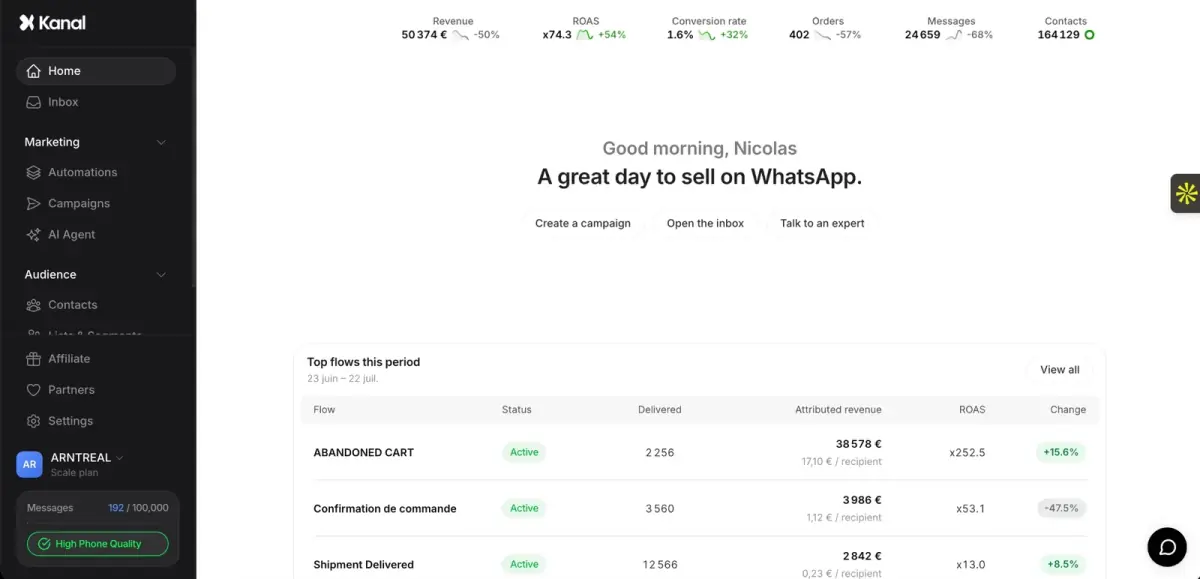
Kanal, our WhatsApp marketing app for Shopify, sends WhatsApp campaigns to segments of your customers, alongside abandoned cart recovery and order notifications. Multi-market is listed from the Scale plan, at €149 a month on the Kanal pricing page read on November 4, 2026, and Meta bills each WhatsApp message on top at its rate for the recipient's country.
Shopify Markets at a glance
| Item | Rate or rule on November 4, 2026 | Source |
|---|---|---|
| Country or region markets | Included on all plans, no limit on their number | Help Center |
| Multi-currency payments | Shopify Payments or Adyen required | Help Center |
| Currency conversion, US store | 1.5% with Shopify Payments, 3% with PayPal Wallet | Help Center |
| Duties calculated at checkout | 0.5% (temporary since February 2, 2025); regular 0.85% or 1.5% | Help Center |
| Theme customization per market | Advanced and Plus | Help Center |
| Languages | Up to 20 on Basic, Grow and Advanced; up to 30 on Plus | Help Center |
| Managed Markets fee | 3.5% on Basic, Grow and Advanced; 3.25% on Plus | Shopify international pricing |
| Managed Markets eligibility | Businesses in the continental US, certain stores in Canada and the UK | Help Center |
Shopify Markets adds no fee to your plan and charges per international sale. Start with one market in Draft, check the shipping rates, the currency and the translation, place a test order, then decide whether the 3.5% Managed Markets fee is worth handing tax registration and duties to Global-e.
See Kanal on your own store
- Your campaigns and cart reminders on WhatsApp, starting from your own store
- Post-purchase offers, back-in-stock alerts, then the AI agent that advises your customers
- You leave with the plan that fits and its price
From €89/month
- brands
- 500+
- to set up
- 5 min
- open rate on WhatsApp
- +90%
Nicolas helps e-commerce brands grow revenue with WhatsApp marketing. With deep expertise in Shopify ecosystems and conversational commerce, he shares proven strategies for abandoned cart recovery, broadcast campaigns, and AI-powered customer engagement.